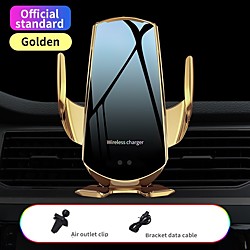
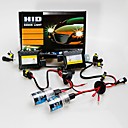
Car HUD Head Up Display Quick Wireless Charger GPS Navigation Display Holder Charging
Specification:Shell Material: ABS and plexiglass Input: 9V 1.5-2A Output: 5-9VPower: 10WCharge Sensing Distande: 4mm-6mmApplicable Models: Compatible with QI wireless charging.Parameters:Usable model: Usable for all modelsFixed mode: Anti slip mat/silicone pad Body material: ABS high temperature resistant/PMM vacuum coating Compatibility: Support mobile digital products with screens less than 7 inchHUD angle: Adjustable for around 198 degreesFeatures:✔ Navigation projection: Through APP, the navigation interface of the mobile phone will be perfectly projected to theglass screen on the bracket ✔ Mobile support: Its also a unique bracket and can replace the traditional suction cup-bracket ✔ Angle rotation: The screen can freely rotate for 180 degrees, so you can easily select the appropriate viewing angle ✔ Rotating base: It has a unique rotation base of 360 degrees, with better view and nicer stability ✔ Transparent display: The screen is made up of high-definition organic glass with a coating film, which wont block yoursight in the navigation ✔ Convenient installation: The bottom is fixed with silicone pad, stable and reliable and will not leave any spots on the car✔ Anti slipshock: Shrink clip which will effectively prevent the mobile phone from being bumped off during drivingNotice:- Please allow slight dimension difference due to manual measurement.- Please consider the actual sizes in the listing as the pictures are generally enlarged to show detail.- Due to different pro
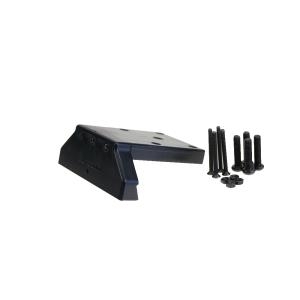
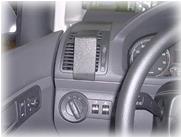
Brodit ProClip Center mount - Befestigungsklammer(n) - Schwarz
Kurzinfo: Brodit ProClip Center mount - Befestigungsklammer(n) - Schwarz Gruppe Zubehör Hersteller Brodit Hersteller Art. Nr. 854781 Modell ProClip Center mount EAN/UPC 7320288547817 Produktbeschreibung: Brodit ProClip Center mount - Befestigungsklammer(n) Produkttyp Befestigungsklammer(n) Produktmaterial ABS-Kunststoff Farbe Schwarz Ausführliche Details Allgemein Produkttyp Befestigungsklammer(n) Produktmaterial ABS-Kunststoff Farbe Schwarz Verschiedenes Besonderheiten Mittelmontage Platzierung/Befestigung Armaturenbrett
i1000 HD 1080P Doppelobjektiv-Camcorder Auto-DVR-Schlag-Nocken Black Box mit R¨¹ckfahrkamera Motion Detection RGP-521327
Produkt-Eigenschaften: Haupteigenschaften: - 120-Grad-Ultraweitwinkelobjektiv - Doppelobjektiv mit hohen Qualit?t Aufl?sung. - Auto-Nachtsicht. - Bewegungserkennung. -Seamless Looping Video. - Bereiten Sie Aufnehmen. - einschalten, w?hrend Auto Einschalten, ausschalten, w?hrend Auto Shutdown - Emergency-Lock-Funktion. Aktualisieren Sie die Datums- und Uhrzeitfunktion. - G-Sensor-Funktion, Low-Power-Erkennungsfunktion, Kamera Wiedergabefunktionen Produktspezifikationen: Farbe: Schwarz Features : G-Sensor, Bewegungserkennung, Loop Zyklus-Aufnahme, Zeit- und Datumsanzeige Bildschirmgr??e: 2,0 Zoll Camera Lens : 2 Objektiv - Winkel : 120 ¡ã Kompensations - LED : Ja Decode Format: H.264 Video Aufl?sung: 1920 * 1080 (1080P FHD), 1280 * 720 (720P) Video-Bildrate: 30fps Videoformat: MOV Loop Record: Ja Video-Ausgang: NTSC / PAL Frequenz: 50Hz, 60Hz Motion Detection : Ja G-Sensor : Ja Schnittstelle: USB-Anschluss, TF-Karten-Slot Speichererweiterung: Mikro-SD / TF Maximale Kapazit?t: 32GB Montageart: Windschutzscheibe Modell: i1000 Bild Pixel: 300 W Bildsensor: 1/4 Zoll-Farb-CMOS LED-Nachtsicht-Unterst¨¹tzung: 4 Infrarot-LEDs Foto-Format: JPEG Batterietyp: Wiederaufladbare Lithium-Ionen-Akku Batteriekapazit?t: 320mAh Gr??e: 91 x 63 x 28mm Nettogewicht: 85 g Packungsinhalt: 1 x Benutzerhandbuch 1 x Auto-Ladeger?t 1 x-Montage-Halter 1 x USB-Kabel 1 x DVR-Host
2.5 pouces LCD HD 1080P 5.0 Mega 4x Digtial Zoom voiture DVR Video Recorder
Taille d'écran:2.5 pouces; Capteur d'image:CMOS 5.0MP; Support vision nocturne LED:1 LED infrarouge; Format de photo:JPEG; Format de vidéo:MOV; Résolution de photo:4000 x 3000; Résolution de vidéo:848 x 480,1440 x 1080,1920 x 1080,HD1280 x 720; Grand angle:120 degrés; Détection de présence:Oui; Enregistrement en boucle:Oui; Slot pour carte de stockage:Carte SD; Mémoire maximale supportée:32Go; Support sortie TV:Oui (PAL/NTSC); Type de batterie:Batterie rechargeable lithium-ion; Ports:HDMI,Slot SD,Micro USB,Sortie AV; Langues:Japonais,Russe,Anglais,Chinois simplifié; Couleur:Argent; Dimensions / LxWxH (mm):1055328; Poid net (kg):0.2; Liste d'emballage:1 x câble TV,1 x support de montage,Pochette de 1 x,1 x HDMI Cable,1 x Mannuel d'utilisateur,1 x Chargeur auto,1 x Câble USB; Grand Angle Appareil Photo1:120 degrés
Moonbeam Serie 24 LED 14 Modi Bernstein / Gelb Runde Dach Notfall rotierende drehbare Blitzleuchte mit magnetischen Halterungen für 12V Fahrzeug LKW Auto Lightinthebox
Kotierung:11/20/2020; Speziell ausgewählte Produkte:COD
iMars TX11-C bluetooth 5.0 + EDR Audio Transmitter Support 3.5mm AUX Coaxial USB Audio Input Interface
iMars TX11-Cbluetooth 5.0 + EDR Audio Transmitter Support3.5mm AUX / Coaxial / USB Audio InputInterfaceProduct Parameters:Brand:iMarsbluetooth version: 5.0 + EDR Working distance: About 8M Power supply mode: USB DC5V Audio input interface: 3.5mm AUX / Coaxial / USBProduct use:TV coaxial use:1.Plug the audio cable into the coaxial adapter at one end,then plug the adapter into the coaxial audio output port oftheTV, and plug the other end of the audio cable into the coaxialinterface of the transmitter.2.USB power supply: mobile phone charger / TV USB/Computer USB etc3.Plug the TX11-C into the USB 5V charging port( Phone charger/Mobile power / TV USB / PC USB )4. After the TX11-C is powered on, when the blue LED flashes,it indicates that the product startup is completedand hasentered the search pairing state.5. Turn on the bluetooth audio/earphone and enter the pairablestate, waiting for the TX11-C to automatically pair.After the pairing is successful, the blue LED light is always on.5,set the audio output of the TV, different TV settings will be different.Millet TV: Settings -- Output Devices -- SPIDFLeTV: Settings - Sound - Speakers External speakersSharp TV: Settings -Digital Audio Output - PCM16Samsung TV: Settings - Output Settings - External SpeakersMore TV settings are in the collection...Computer use installation:1. Insert TX11-C into the USB of the computer, LED red and blue flashing.2. Turn on the bluetooth headset or bluetooth stereo, and enterthe pairing status.3. Wai